GitFlow looks good on a diagram. Every branch has a purpose, the arrows go where they're supposed to, and you can follow a feature all the way from development to production. Then product pulls a feature from the release, another team needs to ship before you, and somebody finds a production bug. Now the discussion about getting a fix out has become a discussion about which branches need to merge into which other branches.
None of that is particularly unusual. A feature can work perfectly and still need to wait for the business. Four tickets can be ready while the fifth needs another week. Two teams can have different release dates while changing the same application. These are things the process needs to accommodate without everyone getting on a call to interpret the diagram.
GitFlow has procedures for release branches and hotfixes. It can handle overlapping work, and you can use it with a build-once pipeline. But when the next release starts with everything in develop, changing what should ship can mean undoing work that was fine to integrate. The branch has started making a business decision for you.
The approach I use builds on Skullcandy's workflow and separates those decisions. Developers need somewhere to combine their work. The business needs to decide what goes live. QA needs to know what to test, and app support needs to know what to deploy. Giving each of those a clear place in the process makes the whole thing easier to operate.
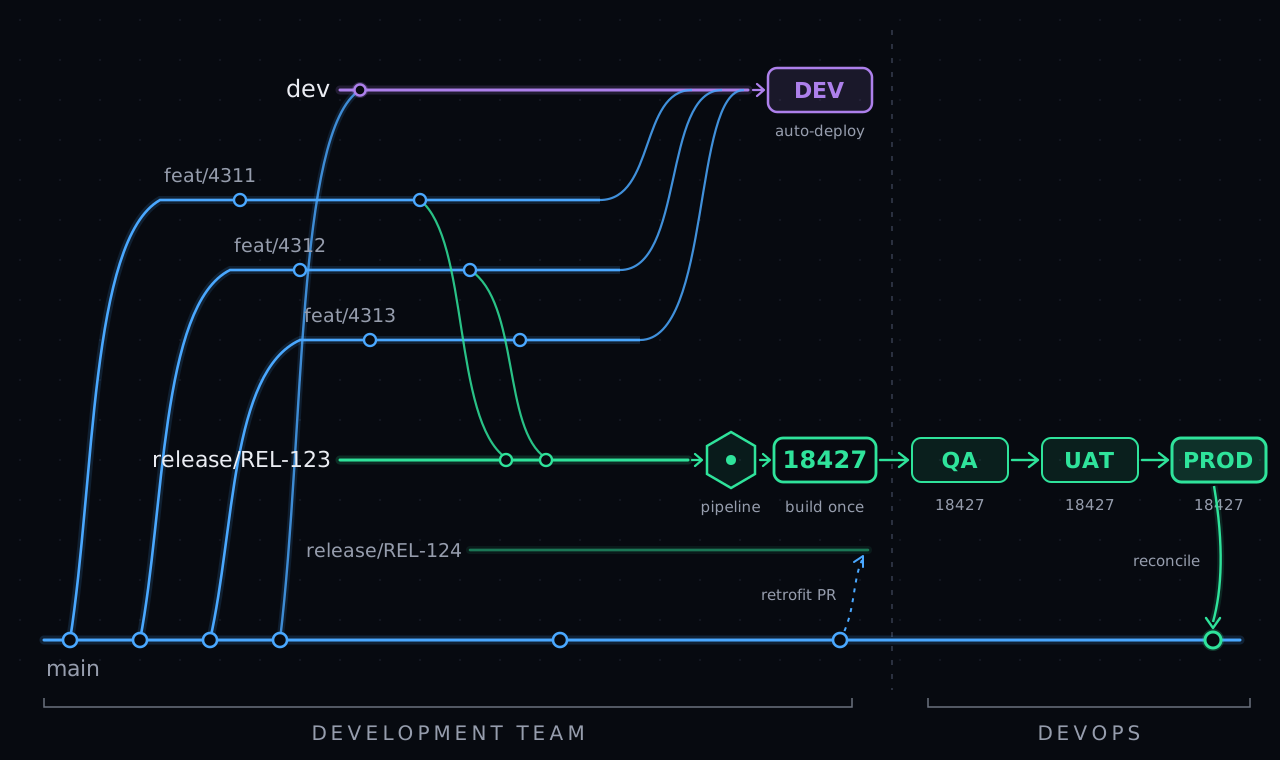
Dev is where the work meets
Integration tells you whether upcoming changes work together. Release selection decides which of those changes should ship.
I still want a dev branch. Two teams can each write something reasonable, test it on their own, and find out they break each other's functionality when the changes meet. I'd like them to find that out while they're still developing it.
Merge the work into dev and deploy it to a shared development environment. Let people see what happens. It can be a bit of a wild west, as long as someone investigates the failures and the team can get it working again. A permanently broken environment won't tell you much. But it doesn't need to be ready for production every time someone merges a ticket.
That leaves the branches with fairly straightforward jobs:
| Branch | What it contains | What we use it for |
|---|---|---|
feat/$ticket | Work tied to a particular ticket | Develop and review the change |
dev | Upcoming work from the teams | Find problems between changes early |
release/$release_ticket | Work deliberately selected for a release, linked to its release ticket | Build and validate that combination |
main | Source corresponding to the successful production baseline | Start new work and update releases still in flight |
For an independently releasable ticket, start the feature branch from main. Merge it into dev for integration, but keep the feature branch available for release selection. If you branch from a dev that already contains five other features, those features come along in the history. Calling the new branch a ticket doesn't make it independent.
The same applies when one ticket actually needs another. They have to travel together, or someone has to separate the dependency. This process gives you control over the release contents. You still need to understand what the code depends on.
A late ticket misses the train
When it's time to prepare a release, start a release branch from the production baseline and bring in the selected ticket branches. The developers own assembling that combination and making sure it works. Passing tests in dev is useful evidence, but the selected combination needs testing too.
Now if four tickets are ready and the fifth is late, the four can leave. If product says a feature needs to wait, leave it out of the release. It can stay in dev, where people are already testing it with upcoming work. Nobody needs to undo that integration just to keep it out of production.
That's the release train. The train leaves with the work that's ready. The late ticket gets on the next one.
There is still work involved if someone changes their mind after the release has been assembled. Remove the feature or assemble a new candidate, check the dependencies, and test the new combination. The benefit is having an explicit list of what belongs in the release, so you're dealing with a scope change instead of trying to work out what happened to be in dev on Thursday.
Two teams releasing the same application at the same time also need to talk. Put their selected work together and test it as a combined release. Two individually approved builds don't magically become one approved application because the release calendar has them in the same slot.
Use release/$release_ticket to connect the release branch to its release ticket, like release/REL-123. That gives the selected work, build, and approvals a release record to connect to. I also prefer names that tell people something about the work, so you can add a description: release/REL-123-billing-refunds-and-login-fix. If your team uses semantic versioning, you can include that too, like release/REL-123-2.4.0. Keep the actual ticket list with the release, and keep the timing in a calendar people can read. A branch name is a poor place to maintain a schedule that keeps changing.
The build is the handoff
Developers assemble the release. QA and release management work with the artifact that assembly produced.
Up to this point, the developers have been working with code. They've reviewed it, unit tested it, resolved conflicts, and decided which changes belong together. Then the pipeline produces the release build.
That's the handoff. At the end of the day, QA and release management should be able to do their jobs without reconstructing our Git history. They need the build, the tickets it contains, and the information required to test and release it. Dev should be able to say, "Go release build 18427," and give them everything they need to continue.
Using an example build number, QA tests 18427, user acceptance testing approves 18427, and app support deploys 18427. They can follow that ID back to the source and pipeline if they need to investigate something. They don't need to ask a developer which of three similarly named branches was the right one.
The developers still own the quality of what they handed over. If the build is wrong, that's theirs to fix. But where the organization separates development from production access, another team can carry the artifact through the release process. The developer doesn't need to sit beside them and explain which files to copy.
A commit doesn't tell you what was built
Use the build pipeline's run ID as the release identifier. Put it in the Docker image tag, like myapp:18427, or use it as the artifact version. Now the thing being deployed points directly to the run that produced it. That build record connects the commit hash, the time of the build, the pipeline, and the inputs used during that run. The commit identifies the source; the build ID connects that source to the conditions that produced the artifact.
Build that same commit seven months later and you can get a different artifact. A dependency's dependency may have changed, a base-image tag may point somewhere else, or the build-time configuration may be different. Some inputs may only have existed in the build environment at the time. None of that requires a change to your application code. The commit hash alone won't distinguish those two builds. Separate build IDs will.
Keep those inputs recorded against the build: the source revision, pipeline version, resolved dependencies, and relevant build-time configuration. Retain the artifact and its checksum or image digest, and never overwrite its build-ID tag with a later build. That keeps the link intact from what QA tested to how it was produced and what eventually reached production. Build provenance describes that relationship between the build, its inputs, and its output.
Keep the artifact available for the release and rollback period too. A link to a deleted build is not much of a handoff. In Azure Pipelines, for example, deleting a pipeline run also deletes its associated pipeline artifacts.
Once that build exists, promote it. Don't compile it again for QA, again for UAT, and again for production. Environment-specific values can come from deployment configuration, with their own record of what changed. If a value gets compiled into the application, changing it changes the artifact, so that needs to be accounted for in the build and testing approach.
Now when someone asks whether production received what QA tested, there is something concrete to check. Compare the artifact identity. Nobody needs to argue that the code was basically the same.
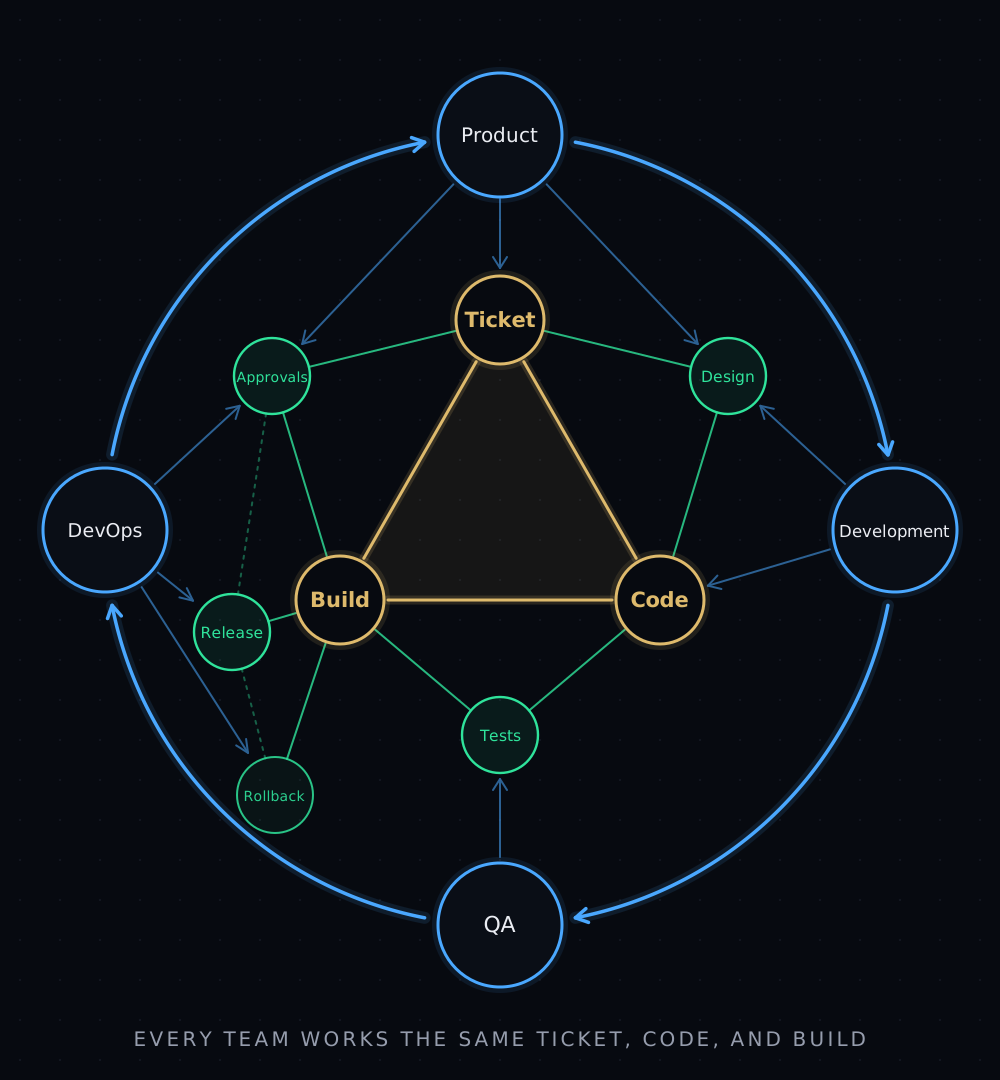
Connecting ticket numbers, branches, and releases to the build ID gives the whole company something to work from. Product can follow a requirement through design, development, testing, and into production. QA knows which build it tested, release management knows what was approved, and operations knows what went live and what it can roll back to. When something needs to change, that history feeds back into the next product decision. Each department has its own responsibilities, but they're all working with the same connected record. That's how the branching and release strategy becomes part of an enterprise-wide product delivery process.
Production changes while you're working
Every successful release changes the baseline for the releases still in flight.
Say two teams are preparing releases from the same production version. Team A ships first. Team B still has another week of testing. Team B now needs Team A's production changes in its release, or it risks undoing them when its own build goes live.
After a successful deployment, reconcile the source revision that produced that build into main. Be precise about the revision. If someone added another ticket to the release branch after the build, merging the current branch tip would record code that hasn't reached production.
Then have automation open main-to-release pull requests for the releases still in flight. That's the retrofit. Run the checks, let the developers resolve conflicts, and build and validate the updated release. The automation can find the branches and open the PRs. It can't decide what a conflicting business rule should do.
A hotfix follows the same path. Start from the production baseline, make the fix, build it, validate it, and deploy it. Once it succeeds, update main and retrofit the active releases. I don't want someone remembering which teams were preparing something when the incident happened.
If two releases are ready together, coordinate that final promotion so one can't slip past the other's baseline update. If production rolls back, record the artifact actually running and reconcile the baseline accordingly. main is useful here because people can start from it with a clear understanding of what production contains. The deployment record still tells you exactly which artifact and configuration are running.
Automate the things people forget
A process can have a very clean diagram and still need everyone to remember twenty rules. That's where I start looking for automation.
The ticket number in feat/$ticket can link the branch and PR to the work item. The release ticket number in release/$release_ticket provides the same connection for the release. When that branch appears, automation can open the release PR, link it to the release ticket, and collect the work items selected for it. The build record can carry those links forward. Release management gets a useful account of what's shipping without someone spending Friday afternoon reading commit messages.
Approvals belong to a specific build. If QA approved 18427 and somebody adds another ticket, that approval still describes 18427. The new build needs its own validation. Moving the branch forward must never quietly move the approval with it.
The deployment pipeline can accept an existing build ID, retrieve the retained artifact, verify it, and check that the required approvals refer to it. Successful deployment then triggers the production reconciliation and retrofit PRs. Those are the seams where a small amount of automation saves a lot of chasing people.
There are still decisions for the team. Is the feature ready? Can these changes ship together? Did testing cover the affected behaviour? Should the release proceed? I want people spending their time on those questions. They don't need to manually copy a ticket number through five systems to prove they made the decision.
Here is the whole lifecycle as a working model. Add features, open releases, and drag tickets between trains. Build a release, promote the build through the environments, and watch what shipping does to the releases still in flight. Click a branch count to unfold the branches behind it.
Click a commit, a build, or a lane badge to see what it carries.
Drag a ticket into a release, or tap it and tap the destination.
feat/4311 is selected into REL-122. feat/4312 is only integrating in dev.
Where this works well
A large shared platform is where this starts earning its keep. Lots of developers, several teams, and different priorities all meeting in the same codebase. They need to find out whether their changes work together, but they shouldn't all have to be ready on the same day. Shared integration gives them somewhere to find those problems, while selected releases let independent work move when it's ready.
Even on a smaller tool, developers work at different speeds. One person finishes their tickets quickly, another needs more time, and somebody else is working through a problem nobody fully understood when they estimated it. The finished work can ship without making everyone else's progress a condition of release. People still need to help each other, but the release doesn't have to wait for every ticket in the sprint.
The same applies to a product with a major feature under development and a steady stream of smaller improvements. A redesign might take months. A login fix shouldn't have to wait for it. Keep testing the larger change in dev, and release the smaller, independent changes as they're ready. Retrofitting the production baseline keeps the larger release up to date with what shipped in the meantime.
An onshore/offshore split makes the handoff especially useful. The developer who prepared the build might have finished their day before the release team starts. If the release ticket identifies the build, its contents, and its approvals, the next team can pick it up without waiting for someone to come online and confirm which branch they meant. Questions about the work still need a conversation. Finding the approved artifact shouldn't require one.
I wouldn't add all of these branches to a team that already ships small changes safely from a single trunk. And if you're maintaining several supported product versions, you'll still have version-specific work to account for. The value here comes from letting work move at different speeds while keeping the release handoff clear.
What I like about it is how little the release process needs to know about the developers' day-to-day branching. They can combine work, try things in dev, and prepare different releases. The important questions stay answerable: which tickets are in this build, who approved it, what went to production, and which releases now need the update.
That's what I mean by simple. A few rules the system can enforce, enough room for the teams to work, and a build ID that tells everyone what we're talking about.